
Changes to the listing of domains in the control panel

To reduce the number of clicks required in our control panel to access frequently used features, you'll notice some adjustments to the listing of your domains the next time you login.

Links to settings for DNS, Nameservers, and Whois records are now available from within the list of domains. Information on the status and service level for each domain is now displayed using colour-coded tags.
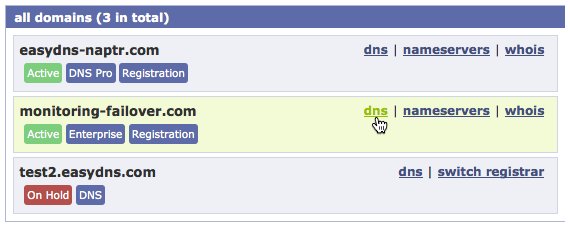

Tweaks to the control panel domain listing

Share

2 Comments to Changes to the listing of domains in the control panel

  1. February 10, 2013 at 6:23 pm | Permalink

    Dear Madam/Sir,

    I have several domain names. My email address has been changed to –redacted–

    How I can change them all at once? Please advise.

  2. February 12, 2013 at 2:10 pm | Permalink

    Hi there,

    Sorry for the delay, please send support queries to support@easydns.com for faster response.

    You can change the whois information for multiple domains of the same TLD (.com, .net. .Org, etc..) by going to the 'utilities' link at the top left-hand side of your user's page. (opens the page https://cp.easydns.com/utilities/) and selecting "Bulk Whois update"

    Regards

    easyDNS Support

Leave a Reply

For assistance from our Support Department, please do NOT leave a comment here.
During our regular business hours, please call us toll-free at 1-855-321-EASY(3279) in North America, 0-8000-321943 in the UK, or directly at 1-416-535-8672, or email us at 'support@easydns.com'.

You can use these HTML tags and attributes: <a href="" title=""> <abbr title=""> <acronym title=""> <b> <blockquote cite=""> <cite> <code> <del datetime=""> <em> <i> <q cite=""> <strike> <strong>

Status Updates

Receive new posts via email

Loading...Loading...


Sign up for Domain Insights From The easyDNS Guy

Get "The easyDNS Guy's" 3-part Domain and DNS Boot-camp delivered free to your inbox, plus topical musings on the state of the domain landscape.
* = required field
Interests